One command to start building with OpenSearch from your IDE.
OpenSearch Agent Skills give AI coding agents the workflows, tools, and OpenSearch-specific context they need to build search applications, analyze observability data, and manage OpenSearch clusters directly from your preferred IDE.
Compatible with Claude Code, Cursor, Kiro, GitHub Copilot, Windsurf, and any agent supporting the Agent Skills standard.
Install once, then describe your goal.
Your agent executes the workflow: provisioning a local cluster, configuring indices, selecting the right search or analytics strategy, and delivering a working result.
What are Agent Skills? The workflows your agent was missing.
OpenSearch Agent Skills help agents execute tasks correctly instead of relying on generic model knowledge. They provide structured, reusable workflows, verified commands, scripts, and domain-specific context that AI coding agents can run.
The result: your agent builds correctly, not just plausibly.
Structured workflows
Eliminate improvisation with structured execution flows that the agent follows in order.
Verified commands
Real CLI commands and bootstrap scripts ready for your agent to execute.
OpenSearch patterns
Incorporate precise PPL syntax, index mappings, and hybrid retrieval to build correctly the first time.
A working toolbox
Use the right tools for the job with CLI, local cluster bootstrap, and a Search Builder UI.
Agent Skills Open Standard
Skills can be installed once and used across supported coding agents. OpenSearch skills follow the open Agent Skills standard, originally developed by Anthropic and now adopted across the AI development ecosystem. Now your workflows can move with you across IDEs and agents.
Available skills
Install the whole library, or pick the one workflow you need. Each skill is a self-contained bundle: workflow, commands, context, tools. As an Apache 2.0 project, more Agent Skills will continue to be added with community support.
Skill | Search
opensearch-launchpad
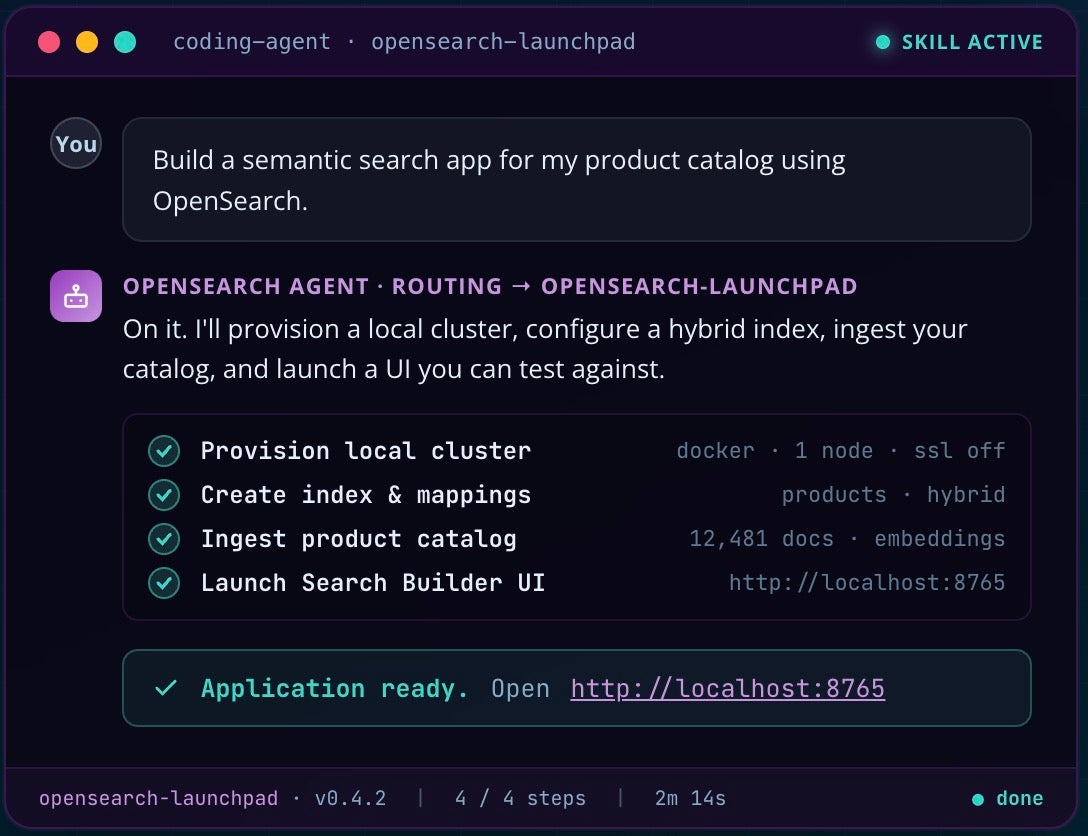
Build end-to-end search applications
Transform requirements directly into a running search application.
Example prompt:
Build a semantic search app for my product catalog using OpenSearch.
$
npx skills add opensearch-project/opensearch-agent-skills@opensearch-launchpadCapabilities
- Local cluster provisioning
- Index creation and configuration
- BM25, vector, and hybrid strategies
- Search Builder UI for testing
Skill | Observability
log-analytics
Analyze logs natively with PPL
Analyze logs using OpenSearch-native observability workflows and PPL.
Example prompt:
Find recurring error patterns across my ingestion pipeline logs.
$
npx skills add opensearch-project/opensearch-agent-skills@log-analyticsCapabilities
- PPL query generation and validation
- Ingestion pipeline configuration
- Error-pattern detection
- Index lifecycle guidance
Skill | Observability
trace-analytics
Trace, correlate, and debug
Follow requests across services to find latency and errors.
Example prompt:
Trace the slowest requests across my services and pinpoint the bottleneck span.
$
npx skills add opensearch-project/opensearch-agent-skills@trace-analyticsCapabilities
- Distributed trace analysis
- Span-level debugging
- Trace-to-log correlation
- Latency and error investigation
Build more at once with multi-skill
Requests like build a search app and analyze its query logs work automatically by chaining skills.
How to get started? Install. Prompt. Build.
Three steps from a blank IDE to a running OpenSearch application. No manual setup in between.
Step 01
Install
One command. Every supported agent.
One command installs OpenSearch skills to your coding agent. The installer detects supported agents, such as Claude Code, Cursor, and Kiro, and configures them automatically.
Step 02
Prompt
Describe it in natural language.
The routing layer selects the right sub-skill based on your intent, so you do not need to name the skill explicitly. If your request spans multiple skills, such as building a search app and deploying it to infrastructure, the agent starts with the appropriate skill and transitions to the next workflow when ready.
Step 03
Build
Working result in minutes.
Your agent provisions a local OpenSearch cluster, executes the workflow, and delivers a working result. A shared CLI handles OpenSearch operations under the hood, and the built-in Search Builder UI on port 8765 lets you test search applications interactively.
Install all OpenSearch skills
$
npx skills add opensearch-project/opensearch-agent-skillsInstall one skill
$
npx skills add opensearch-project/opensearch-agent-skills@opensearch-launchpadopen http://localhost:8765
Search Builder UI ships with every Launchpad build to interactively tune queries, filters, and ranking against your live data.
Build your way with supported agents
OpenSearch Agent Skills work with any agent that supports the Agent Skills standard. Skills can also integrate with MCP servers for enhanced capabilities. The installer can detect and configure MCP servers for OpenSearch, web search, and cloud provider APIs across supported IDEs.
Claude Code
Cursor
Kiro
GitHub Copilot
Windsurf
Gemini CLI
OpenAI Codex
And more.
Why Agent Skills? It’s the difference between a cookbook and a kitchen.
OpenSearch Agent Skills hand the agent a working development environment — cluster, CLI, and UI — so it can build the right way, the first time.
Build faster
Move from idea to a working OpenSearch workflow with less manual setup.
Run real workflows
Skills include scripts, commands, and local tooling your agent can execute.
Go end-to-end
Most platform agent skills help agents write better queries. OpenSearch Agent Skills go further by including executable scripts, local cluster bootstrap, ingestion workflows, and a Search Builder UI. Your agent can provision infrastructure, ingest data, and deploy applications. It is the difference between reading a cookbook and having a kitchen.
Teach your agent PPL
Piped Processing Language is OpenSearch’s query language for observability workflows. LLMs often default to SQL-style syntax and may struggle to produce accurate queries in PPL. Observability skills provide the actual PPL syntax and patterns, helping agents produce queries like:
source = logs | where severity = "ERROR" | stats count() by service.name
Stay open
Skills, scripts, CLI tooling, and OpenSearch itself are Apache 2.0 licensed. There are no open-core restrictions, AGPL redistribution constraints, or relicensing risks.
Extend through the community
The Agent Skills standard makes contribution straightforward. New skills—such as cluster optimization, cost analysis, security hardening, or custom pipeline configuration—can benefit every developer using OpenSearch Agent Skills.
Designed to grow through community contribution.
OpenSearch Agent Skills are designed to grow through community contributions. Every skill follows the open Agent Skills specification, so contributing a new skill is straightforward:
01
Create a directory
Start a new folder for your skill in the repository.
02
Add a SKILL.md file
Describe the workflow, inputs, and expected outcomes.
03
Add scripts & resources
Bring the commands and context your skill needs.
04
Submit a pull request
Open a PR — the community reviews and ships it.
Have a use case that is not currently covered by a skill? Looking for ideas to get started?
Cluster optimization, cost analysis, security hardening, index tuning, and custom OpenSearch Data Prepper pipelines are all strong candidates for new skills.
Your agent has access to built-in tools
OpenSearch CLI
Execute and automate OpenSearch operations.
uv run python scripts/opensearch_ops.py search-docs --query "vector search setup"
What it does
opensearch_ops.py is a unified command-line interface that lets your agent interact with OpenSearch for index management, document ingestion, search queries, and cluster operations.
Why it is useful
- Provides a consistent interface for OpenSearch operations
- Enables agents to execute real commands, not just generate code
- Reduces the need to memorize APIs or switch contexts
When to use it
- Running or debugging search queries
- Managing indices and data
- Automating workflows from scripts or agents
Local cluster bootstrap
Start OpenSearch locally with one command.
bash scripts/start_opensearch.sh
What it does
Starts a fully configured local OpenSearch cluster using Docker.
Why it is useful
- Eliminates manual setup and configuration
- Provides a reliable, reproducible environment
- Lets agents spin up infrastructure automatically
When to use it
- Starting local development
- Testing search or observability workflows
- Running agent-driven builds end-to-end
Search Builder UI
Test and refine your search experience locally.
localhost:8765
What it does
Provides a local web interface for interactively testing and iterating on search applications.
Why it is useful
- Gives immediate visual feedback on search results
- Makes it easier to tune queries and relevance
- Bridges backend setup and user experience
When to use it
- Validating search behavior
- Iterating on ranking, filters, or queries
- Demoing a working search application