
| TL;DR: TLDR: The AOSC (Automatic Online Schema Change) plugin lets you migrate a live OpenSearch index to a new target with different mappings, settings, or shard count—all within the same cluster. It backfills existing documents, replays writes that arrive during the copy, and swaps an alias after a brief write block, so applications only need simple retry logic. Shard-count changes are safe for same-count or power-of-two growth; other layouts carry caveats. AOSC is open-source (Apache 2.0), developed by Atlassian Labs, and available on GitHub. |
If you run OpenSearch in production long enough, you eventually need to change something about an index that OpenSearch will not let you change in place: a field’s type, an analyzer, the routing layout, or the number of primary shards. The mapping you designed a year ago no longer fits the data, or a shard that was comfortable at 30 GB is now uncomfortable at 100 GB.
The standard answer is to create a new index with the shape you want and copy the data across. That part is well understood. The hard part is everything that happens to the live index while you copy: the writes that keep arriving, the deletes you cannot afford to lose, and the cutover moment when applications have to start talking to the new index without dropping data.
This post introduces Automatic Online Schema Change (AOSC), an open-source OpenSearch plugin that handles that workflow. AOSC moves a live index to a pre-created target index, with different mappings, settings, shard count, or document shape, while the source keeps serving writes for most of the migration. It backfills existing documents, replays the source’s operation history so writes made during the copy are not lost, and swaps an alias after a short, explicit write block on the source.
AOSC is not a zero-interruption tool, and it is not a fit for every migration. This post covers the problem it targets, how it works, how it scales shard count safely, and where its boundaries are, so you can decide whether it fits your workload.
Reshaping a live index with today’s tools
OpenSearch gives you several ways to move or reshape data. Each is a good fit for a particular situation, and each leaves a gap when the source index is under continuous write load.
_reindex, copies a point-in-time snapshot of the source into a new index. It is a reasonable default when the source can be made quiet, or when you already have a separate path to reconcile the writes that arrive during the copy. On a busy index, that reconciliation is the whole problem:_reindexdoes not track or replay the writes that land after it starts._splitincreases shard count, but only by an integer multiple, only on an index marked read-only, and only if the index was created with enough routing shards. It does not reshape documents or change mappings._shrinkreduces shard count under its own set of preconditions, and likewise leaves documents untouched.- A hand-built pipeline (
_reindex, then tail changes, then cut over) gives you full control, at the cost of designing backfill, write replay, validation, retry behavior, and rollback yourself. Each of those is a place to get subtle correctness bugs.
The common thread: the native primitives either require the source to stop taking writes, or they hand you the reconciliation problem to solve on your own. On an index that is central to a production write path, neither is comfortable.
 The hand-built path (left) pushes copy, dual-write, reconciliation, and cutover logic into every application. AOSC (right) keeps the application talking to one alias and moves the migration into the cluster.
What AOSC does
AOSC packages the “copy a live index and cut over” workflow into a plugin, scoped deliberately to the case where it can be made correct:
- The migration is within a single cluster (source and target live in the same OpenSearch cluster).
- The target index already exists, created by you with the mappings, settings, and shard count you want.
- Applications write through an alias, so AOSC can move that alias from the source to the target at cutover.
- Applications retry writes that are rejected during the brief cutover window.
Given those conditions, you start a migration with one API call against the source index. You name the pre-created target and the alias to swap, and you can optionally pass a Painless script to reshape documents on the way. It runs during both backfill and replay, so documents written while the migration is in flight are transformed the same way as the ones copied up front. The example below drops a field that is no longer needed:
curl -X POST 'http://localhost:9200/_plugins/_aosc/my-index-v1/_start' \
  -H 'Content-Type: application/json' \
  -d '{
    "target_index": "my-index-v2",
    "alias": "my-index",
    "transform_script": {
      "type": "inline",
      "source": "ctx._source.remove(\"legacy_field\")"
    }
  }'
From there AOSC drives the migration to completion, exposing progress through a status API the whole way. Per-migration options let you tune how far behind a shard may be before cutover and how strictly document counts are validated.
How a migration runs
AOSC separates orchestration from data movement. A coordinator runs on the cluster-manager node and advances the migration through its phases. Shard workers run on the data nodes that hold the source’s primary shards, and do the actual reading and writing next to the data. While a migration is active, its phase lives in the cluster state; the .aosc-migrations system index keeps the migration record for history.
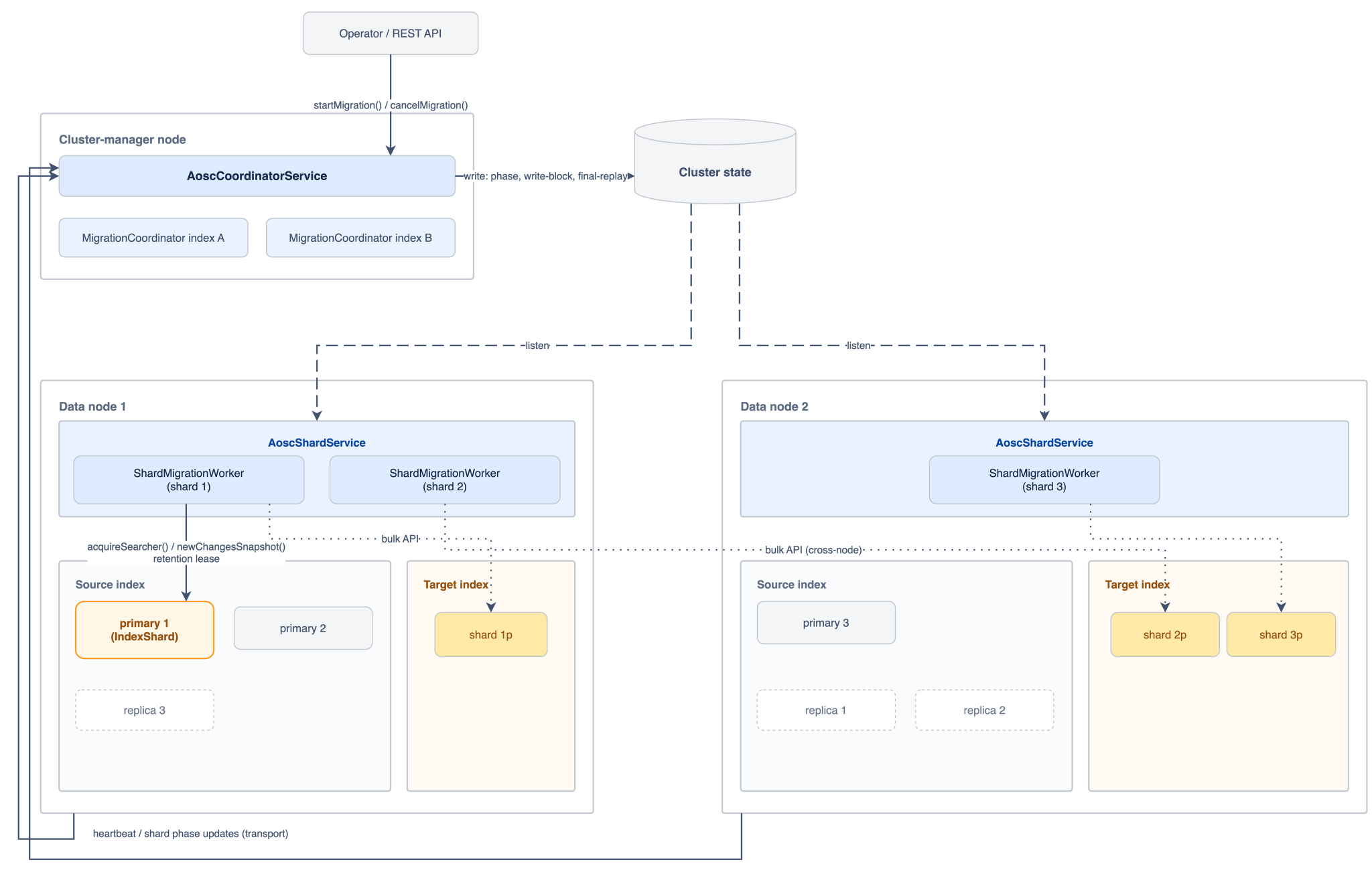 Orchestration runs on the cluster-manager node; the data-movement work runs on the data nodes, next to the shards. The two halves coordinate through cluster state (coordinator to workers) and a transport action (workers to coordinator).
A successful migration moves through these phases:
- Validate. Confirm the source, target, and alias exist and are consistent, the plugin is installed at the same version on every node, and the routing topology is one AOSC can handle (more on that below). AOSC does not create the target for you. That is your chance to get its shape exactly right.
- Prepare the target. Apply transient settings for the copy, such as zero replicas and disabled refresh, so backfill runs faster. These are restored before cutover.
- Backfill. Each shard worker reads existing source documents and indexes them into the target, applying your transform if you supplied one. Reads are anchored by a retention lease so the operation history the workers need is not pruned out from under them.
- Replay. After backfill, workers read the source shard’s operation history and apply the writes and deletes that arrived while the copy was in flight, so the target keeps up with a source that never stopped taking traffic. Replay continues until every source-primary shard is close enough to the source’s current position to cut over. A slow or hot shard holds the migration here rather than forcing a premature cutover.
- Cut over. AOSC applies a write block to the source, lets workers replay the final operations, validates that source and target document counts match within your tolerance, and swaps the alias from source to target.
- Complete. The alias now points at the target. By default the old source stays write-blocked so it cannot silently accept writes after the alias has moved; you can opt into clearing that block automatically.
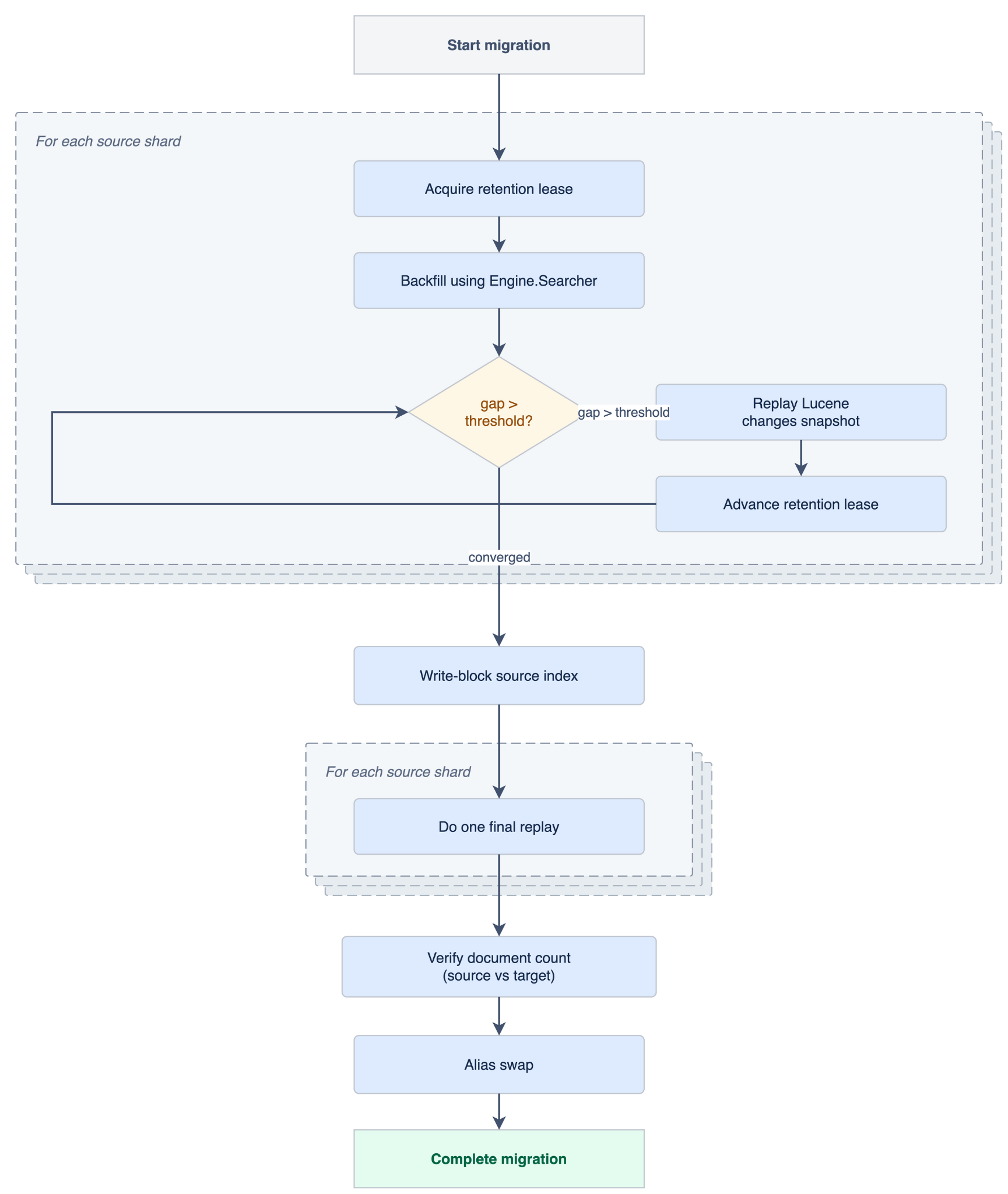
The whole migration in one view: per-shard backfill and replay run while the source stays live, then a short write-blocked tail does the final replay, count check, and alias swap.
The interactive walkthrough in the documentation animates these phases against the exact status fields the plugin reports, which is a useful mental model before your first run.
The cutover window
Cutover is the one interruption applications actually see. During cutover, writes to the source are rejected while workers replay the last operations and the alias swaps. The window is intentional: it is what lets AOSC confirm the target has caught up before traffic moves. The goal is to keep it short, not to pretend it isn’t there.
How long that window lasts depends on your index size, shard count, write load, validation cost, and how responsive the cluster manager is, so measure it against your own workload rather than trusting a single number. AOSC is built to keep the window short; the known limitations note the ranges seen in practice. Your part is the retries. Your application has to retry the writes that get rejected while the block is up, and those retries are what make the window invisible to end users.
Monitoring a migration
Every migration is observable through a status endpoint, so you are never guessing about progress:
curl -s 'http://localhost:9200/_plugins/_aosc/my-index-v1/_status' | jq '.phase'The full response reports the coordinator phase, a per-shard breakdown of backfill and replay progress, and, once cutover reaches completion, a cutover_context with the source and target document counts and whether validation and the alias swap succeeded. A _list endpoint summarizes every migration in the cluster, and a _cancel endpoint stops a non-terminal migration and cleans up after it.
Scaling shard count
Changing mappings or document shape is mostly a matter of the transform above. Changing shard count has one subtlety worth knowing before you try it.
AOSC preserves each document’s routing as it copies and replays it, so documents land on the right target shard. Deletes are the tricky part: OpenSearch’s operation history records the _id of a deleted document but not its routing key (OpenSearch issue 20907), so when the target has a different shard count, a replayed delete can miss the document it was meant to remove.
AOSC handles the common cases, like keeping the same shard count, or growing shard count by a power-of-two factor. It’s able to do so because the shard split logic is deterministic, and it can determine the target shard for an operation given its source shard. Other changes, such as shrinking or non-power-of-two growth, can leave stale documents behind when custom routing is in use, so AOSC will not run them unless you explicitly accept that risk.
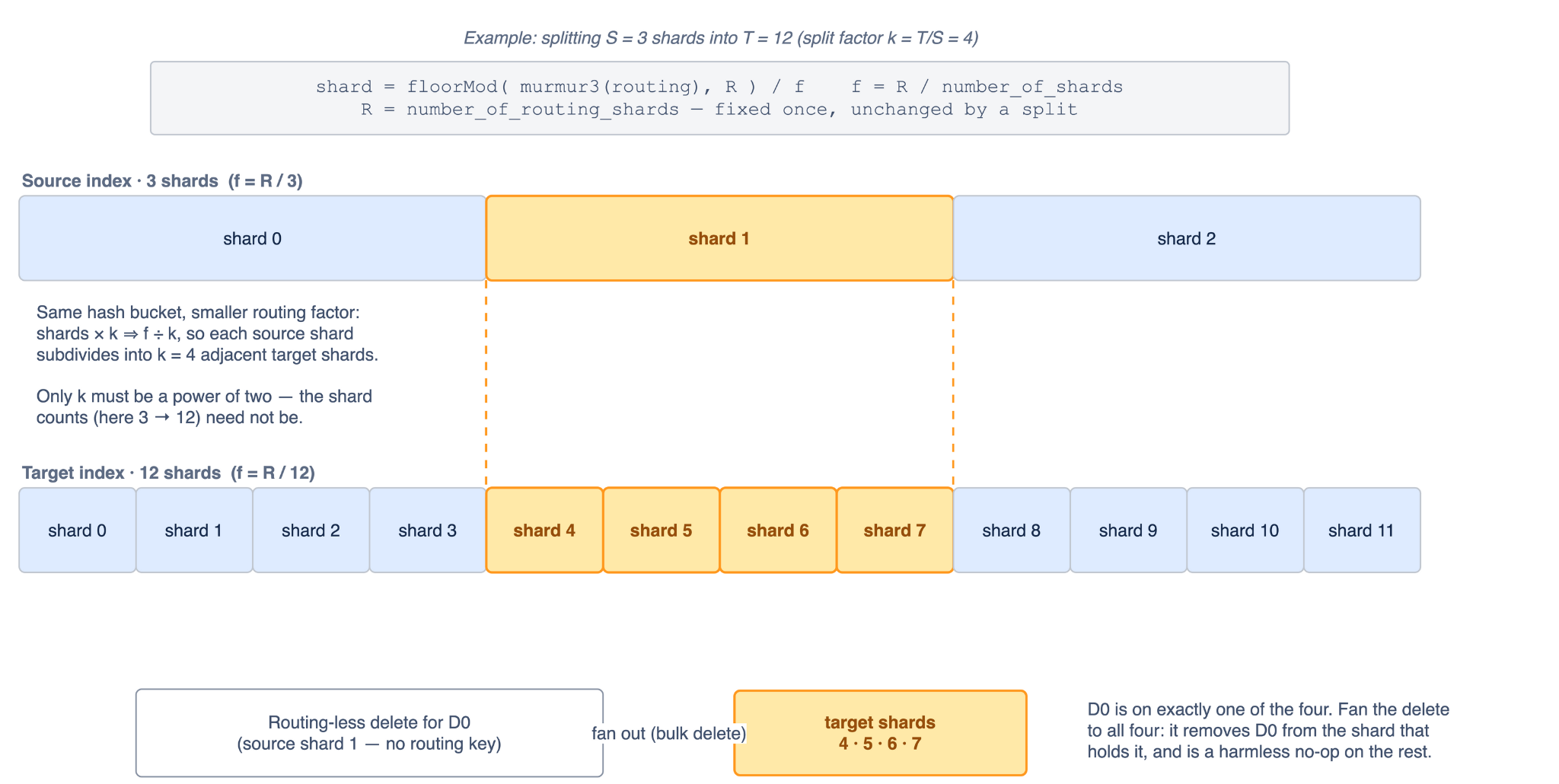
Why a power-of-two split keeps deletes correct: each source shard maps to a fixed block of target shards, so a routing-less delete can be fanned out across that block.
If you plan to change shard count, and especially if you use custom routing, read Routing and Replay first. It spells out exactly which layouts are safe and why.
Operational safeguards
A few design choices shape how a migration behaves when things go wrong:
- Fail closed. If a migration fails before the alias swap, it leaves the alias on the source. AOSC prefers a failed migration you can retry over a partial cutover you have to untangle.
- Backpressure. Backfill is throttled by per-node permits, batch sizing (fixed or adaptive), and backoff after repeated write failures, so a migration does not overwhelm a cluster that is also serving production traffic.
- Validation before cutover. Document counts are compared within a configurable tolerance before the alias moves, so a migration that silently dropped documents does not complete successfully.
- Runtime transform errors fail loudly. Transform scripts are compiled and dry-run at start, but a script that throws on a specific document during migration fails that worker rather than writing incorrect data.
Where AOSC does not fit
AOSC is not the right tool for every migration. Skip it when:
- Cross-cluster migrations. AOSC is same-cluster only, though cross-cluster support may come in the future.
- Migrations without an alias. Applications that read or write concrete index names directly will not follow the cutover. The alias is not optional.
Try it
The fastest way to build intuition is to run a migration locally. The Your First Migration tutorial spins up a Docker cluster, creates a source index with a continuous writer, migrates to a target with a changed mapping and shard count, and lets you watch the cutover happen, retried writes and all, in a few minutes.
AOSC is developed in the open under Apache 2.0. This is an Atlassian Labs project; maintenance and triage are best-effort, with no SLA. We would like it to be useful beyond the environment it grew up in, and feedback, issues, and contributions are welcome.
Resources
- Source: github.com/atlassian-labs/opensearch-aosc
- Documentation: atlassian-labs.github.io/opensearch-aosc
- Production story: Atlassian engineering blog
Get involved
- Open an issue: github.com/atlassian-labs/opensearch-aosc/issues
- Chat on Slack: opensearch.org/slack — reach out to arpitsingla96 or kartikbansal.2803
- Ask on the forum: forum.opensearch.org
- Contribute to OpenSearch: opensearch.org/community