| TL;DR:OpenSearch 3.9 lets you share plugin resources like detectors, monitors, and model groups from the same list where you find them, instead of a separate access page. A share control on each row opens a dialog to grant users, roles, or backend roles access, or make the resource private again. Plugin developers enable it by dropping in a placeholder element: no import and no dependency on the Security plugin. |
New in OpenSearch 3.9, you can share resources from the plugin page that already lists the resource instead of from the Resource Access Management page. You can review the sharing state of every detector, monitor, or model group in the list you are already reading and change it without navigating away.
The resource sharing framework, introduced in OpenSearch 3.3, determines who can access a plugin-defined resource and at what access level. This post describes the OpenSearch Dashboards controls that expose that framework on plugin pages and, for plugin developers, how a plugin adds those controls without depending on the Security plugin.
Sharing a resource where you find it
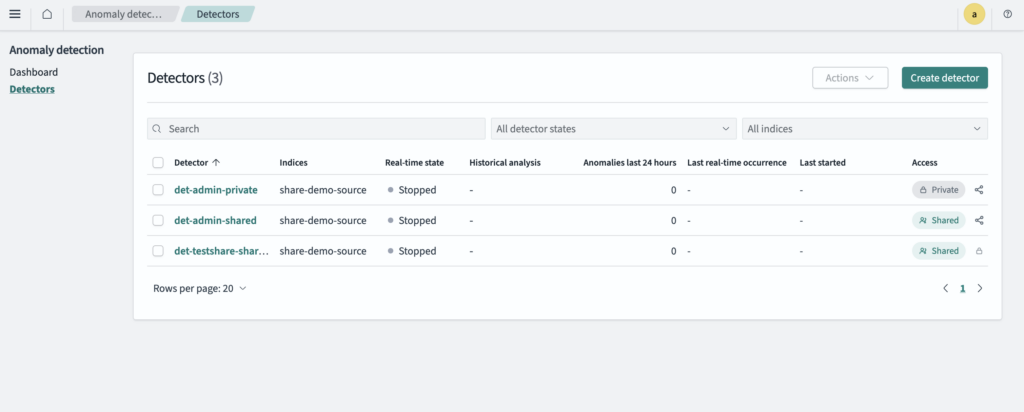
When resource sharing is enabled, a resource list shows whether each resource is private or shared and gives you a control to change it. The following image shows this in the Anomaly Detection detector list.
Selecting the share icon opens a dialog for managing access to that resource. You can share the resource with users, roles, or backend roles at one or more access levels, or make it private again. The following image shows a detector shared with one user at the Read only access level.
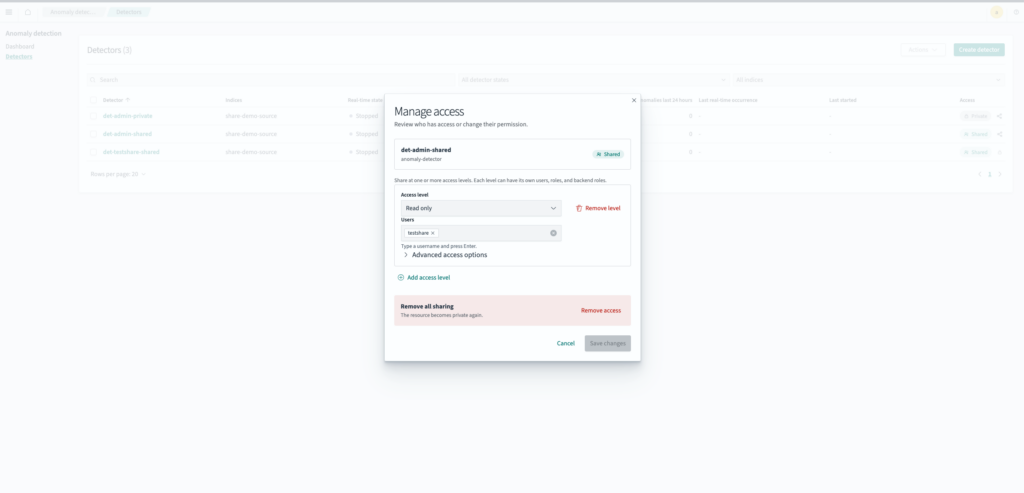
The dialog works the same way in every plugin, though the available access levels come from the plugin that owns the resource: Anomaly Detection defines the levels for detectors, and ML Commons defines a different set for model groups. For the full procedure, see Managing access from a plugin page.
To view the complete flow, watch a short video.
Resources you can share from a plugin page
The following plugins support sharing from their resource lists:
- Alerting: monitors and workflows
- Anomaly Detection: detectors and forecasters
- Flow Framework: workflows
- ML Commons: model groups
- Notifications: channels
- Reporting: report definitions and reports
- Security Analytics: detectors and correlation rules
The sharing controls appear only after an administrator enables resource sharing for the resource type. Otherwise, these lists are unchanged.
Why the controls don’t require the Security plugin
The Security plugin is optional in OpenSearch. A cluster can run without it, and a cluster that runs it can still leave resource sharing disabled. If each plugin imported the sharing controls directly, every plugin would need its own handling for the Security plugin’s absence.
Instead, a plugin marks where the controls belong and renders nothing else:
<div
  data-resource-share-button
  data-resource-id={detector.id}
  data-resource-type="anomaly-detector"
/>
When the Security plugin is installed and resource sharing is enabled, it finds these placeholders and renders the sharing control in each one, along with the permission check that determines who can use it. The plugin that owns the resource needs no import, no plugin dependency, and no manifest entry. On a cluster without the Security plugin, the placeholder renders as an empty div. This follows the same pattern as the resource sharing backend: a plugin registers its resource type, and the framework enforces access.
The controls also resolve the data source from the page that renders them, so on a cluster configured with multiple data sources, sharing applies to the data source you selected.
For the available options, see the resource sharing controls pull request in the security-dashboards-plugin repository.
Next steps
If your cluster already uses resource sharing, you can start sharing resources from the plugin pages listed in this post, with no additional configuration. To enable resource sharing, or to review the access levels that each plugin defines, see the following documentation:
- Resource access management for the OpenSearch Dashboards procedures
- Resource sharing and access control for cluster settings and configuration
- Introducing resource sharing: A new access control model for OpenSearch for the underlying framework introduction
If your plugin owns a resource type that users need to share, adding the placeholder element is the only change required. We welcome your feedback on the OpenSearch forum.