
Build smarter agents, accelerate vector workloads, and streamline observability workflows
OpenSearch 3.8 expands the platform’s search, AI, and observability capabilities with enhanced vector performance, broader agent integrations, and new tools to help you simplify analytics workflows from ingestion to investigation. Whether you’re connecting agents to external systems, optimizing search relevance with AI, or navigating logs and metrics using new query tools, this release delivers real-world improvements for OpenSearch users. New capabilities in OpenSearch 3.8 include:
- Extending Model Context Protocol (MCP) integration to more agent types.
- Streaming ML predictions with lower latency using gRPC transport.
- Ingesting vectors up to 4.16x faster and improving radial search throughput by up to 2.1x.
- Scaling search relevance evaluation with access to more large language model (LLM) providers.
- Streamlining log analysis using a visual Piped Processing Language (PPL) builder, SQL queries, and an onboarding canvas.
- Shaping, pivoting, and comparing time-series data with new PPL commands.
The latest version of OpenSearch is available for download. Read on for a closer look at what’s new and check out the release notes for a full list of updates.
Search modernization
AI-powered search applications demand fast ingestion, flexible agent architectures, and scalable evaluation. OpenSearch 3.8 delivers all three with up to 4x faster vector ingestion, MCP support across all agent types, and LLM-as-a-Judge expanded to work with any provider.
Ingest vectors up to 4x faster with Base64 encoding
OpenSearch 3.8 introduces Base64-encoded vector ingestion for knn_vector fields, eliminating JSON array serialization overhead on both client and server. Float vectors use little-endian byte encoding—symmetric with the doc values binary output format—while byte and binary vectors use raw byte encoding. A 768-dimensional float vector that occupies ~16 KB as a JSON array reduces to just 4 KB in Base64, cutting network payload by 74% and delivering up to 4.16x higher bulk ingestion throughput with 83% lower median latency. The feature works transparently with all supported k-NN engines and requires no mapping changes—simply pass your vector field value as a Base64 string.
Deliver 2x faster radial search with improved recall
OpenSearch 3.8 introduces a redesigned graph traversal for radial search by bounding graph exploration for expensive queries to eliminate the wide latency spread that previously affected radial workloads. In our benchmarks on a 10M-vector dataset (768 dimensions, inner product), radial queries delivered up to 2.1x higher query throughput with 45% lower median latency and up to 77% lower p90 latency compared to OpenSearch 3.7, while improving mean recall from 0.85 to 0.97 for a 14% quality gain. This improvement works out of the box and requires no mapping, query, or configuration changes—existing min_score and max_distance radial queries using the Lucene engine benefit automatically after you upgrade.
Extend MCP integration across agent types
OpenSearch 3.8 extends MCP support to flow and conversational flow agents, enabling additional agent architectures to connect to external MCP-compliant tool servers. Previously, only conversational and plan-execute-reflect agents supported MCP integrations. Now, all four agent types can access your MCP system using a consistent connector configuration, so you can design the workflow that best fits your use case while making the most of your organization’s tooling.
Discover and customize external MCP tools
Two new capabilities streamline how you work with external MCP server tools. A new list tools API (GET /_plugins/_ml/connectors/{mcp_connector_id}/tools) lets you programmatically discover all available tools on a connected MCP server, including each tool’s name, type, description, and input schema, eliminating the manual work of inspecting external servers before configuring your agents. Once you’ve identified the tools you need, new connector-level tool description overrides let you customize how your LLM perceives each tool. By adding a tool_descriptions mapping to your connector configuration, you can provide context-specific descriptions that improve tool selection accuracy without modifying the external server. Special thanks to ML Commons maintainer Abdul Muneer Kolarkunnu of NetApp Instaclustr for contributing to this release’s MCP upgrades.
Control storage growth by using retention policies for agentic memory
Agentic memory containers now support configurable retention policies that automatically delete expired sessions, long-term memories, and history entries based on time or count limits, eliminating the need for manual cleanup scripts. Operators can set cluster-wide defaults for fleet-level management or configure policies per container, and critical memories can be pinned to exempt them from eviction. This experimental feature is enforced on a 24-hour schedule, giving you predictable storage control by eliminating unbounded memory growth.
Stream ML predictions faster with gRPC transport
ML Commons streaming inference now supports gRPC as a transport. Previously, streaming predictions and agent execution were available only over REST using HTTP and Server-Sent Events, which carried text-based encoding overhead for every chunk. New PredictModelStream and ExecuteAgentStream methods let you stream responses from externally hosted models, such as OpenAI Chat Completions and Amazon Bedrock Converse, one token at a time using protocol buffers over HTTP/2. This binary transport delivers lower latency and reduced CPU overhead compared to the equivalent REST streaming APIs, benefiting latency-sensitive and high-throughput applications.
Generate LLM-powered evaluations using new LLM providers
LLM-as-a-Judge in Search Relevance Workbench is no longer limited to OpenAI. You can now generate automated relevance judgments through any ML Commons connector by configuring a provider-specific connector blueprint. Ready-to-use blueprints ship for OpenAI, Azure OpenAI, DeepSeek, Ollama (and other local OpenAI-compatible servers), Google Gemini, Anthropic Claude on Amazon Bedrock, and the Amazon Bedrock Converse API. Also new in this release, transient provider failures, such as timeouts and rate-limit errors, are now reported clearly. A new metadata summary shows total, successful, and failed queries, and the Dashboards judgment view displays a per-document status column so missing ratings are visible at a glance.
Parameterize search experiments with Mustache templates
Search Relevance Workbench now supports Mustache template variables in search configurations, letting you build multi-parameter experiments without duplicating configurations for each filter combination. Previously, search configurations accepted only the single-value %SearchText% placeholder, limiting experiments to simple keyword queries. Now you can reference {{queryText}} along with any custom fields defined in your query set entries—such as category, brand, or status filters—directly in your query DSL. The legacy %SearchText% syntax continues to work unchanged, and the system auto-detects the format that you’re using.
Observability and analytics
Users want a direct path from observability data to actionable insights, ideally without switching tools or composing queries from scratch. OpenSearch 3.8 streamlines the workflow with a visual PPL builder, in-editor linting, SQL support in Discover logs, and one-click alert creation from metric exploration.
Get to insights faster with Explore logs enhancements for log analytics
OpenSearch 3.8 introduces new Explore logs enhancements that streamline log analysis workflows for operators and developers at every skill level. A new visual PPL query builder lets you construct queries by selecting filters, aggregations, and sort criteria from menus rather than writing syntax by hand, with seamless toggling between the visual builder and the raw code editor when you need full control. If you prefer SQL, Discover logs now includes experimental support for SQL queries, with full date picker integration and coverage across the Logs, Visualization, and Statistics tabs.
A new Explore logs onboarding canvas helps you explore your data before writing a single query. The canvas displays per-index cards showing severity histograms and live log-line previews at a glance. Additionally, it guides you through turning raw indexes into durable, reusable datasets, reducing the time from data landing in your cluster to actionable investigation. Available on an opt-in basis, these updates provide a simplified experience for users who are new to OpenSearch observability tools. The following image shows the updated interface.
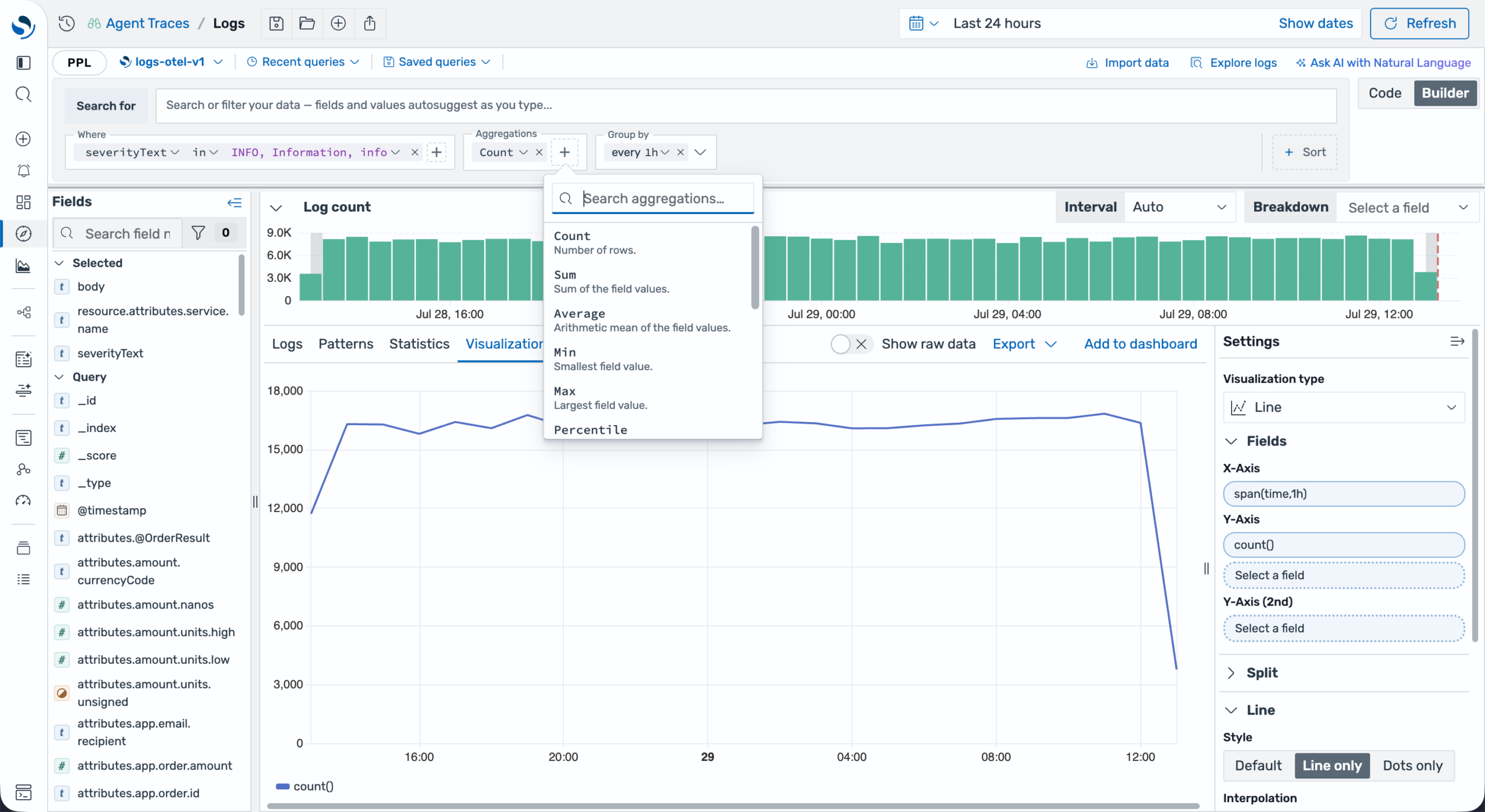 Search, filter, and aggregate your logs with the new PPL query builder in Explore logs
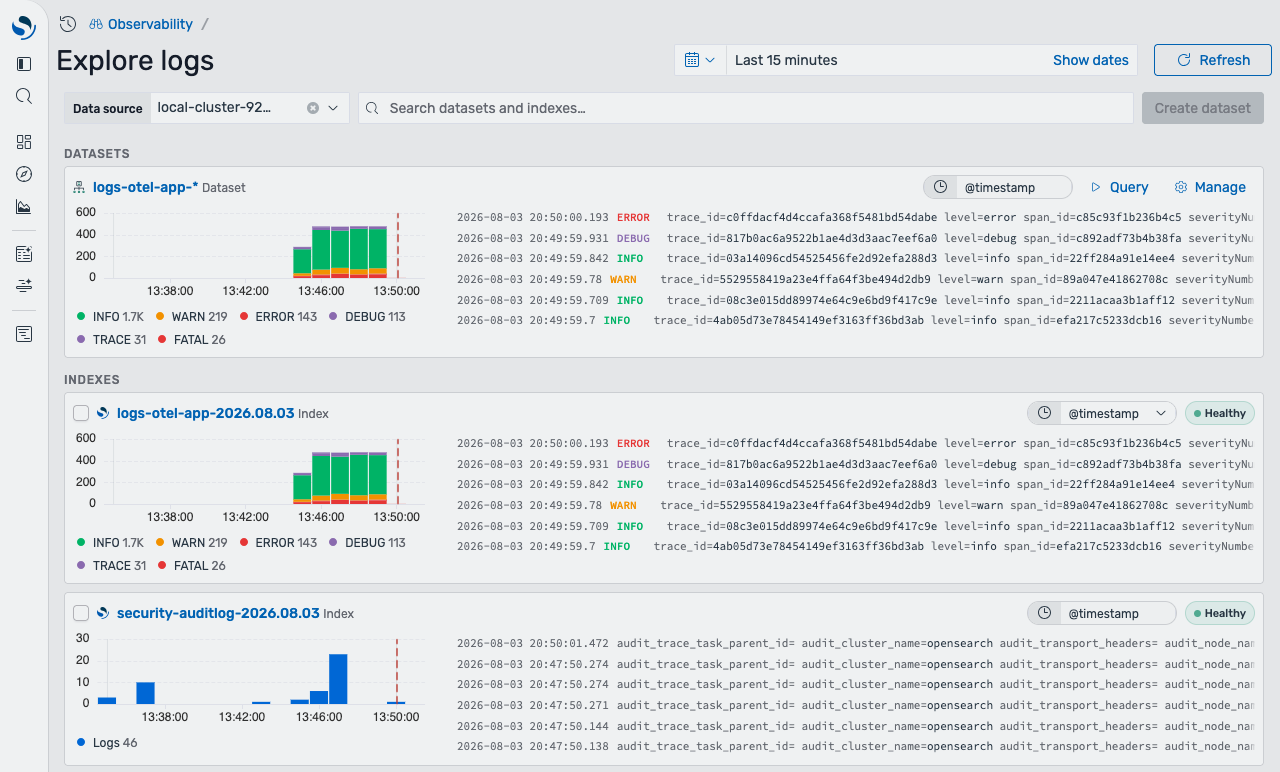 Get started with log analytics quickly by using the new Explore logs onboarding canvas
Shape and compare data using new PPL commands
OpenSearch 3.8 adds four new commands to the Calcite implementation of PPL. These commands make it easier to shape query results, compare time periods, and prepare data for analysis and visualization:
- The new
makeresultscommand generates rows in memory without reading data from an index. You can generate either a fixed number of timestamped rows or an inline typed table, making it useful for testing queries, building eval expressions, and creating documentation examples. - The
foreachcommand applies the same eval expression to multiple fields or array elements, eliminating the need to repeat the expression for each field. - The
xyseriescommand pivots grouped, row-oriented results into a wide table with one column per series, making the output suitable for dashboards and charts. - The
timewrapcommand reshapestimechartoutput for period-over-period comparisons, such as day-over-day or week-over-week, by placing each time period in a separate column.
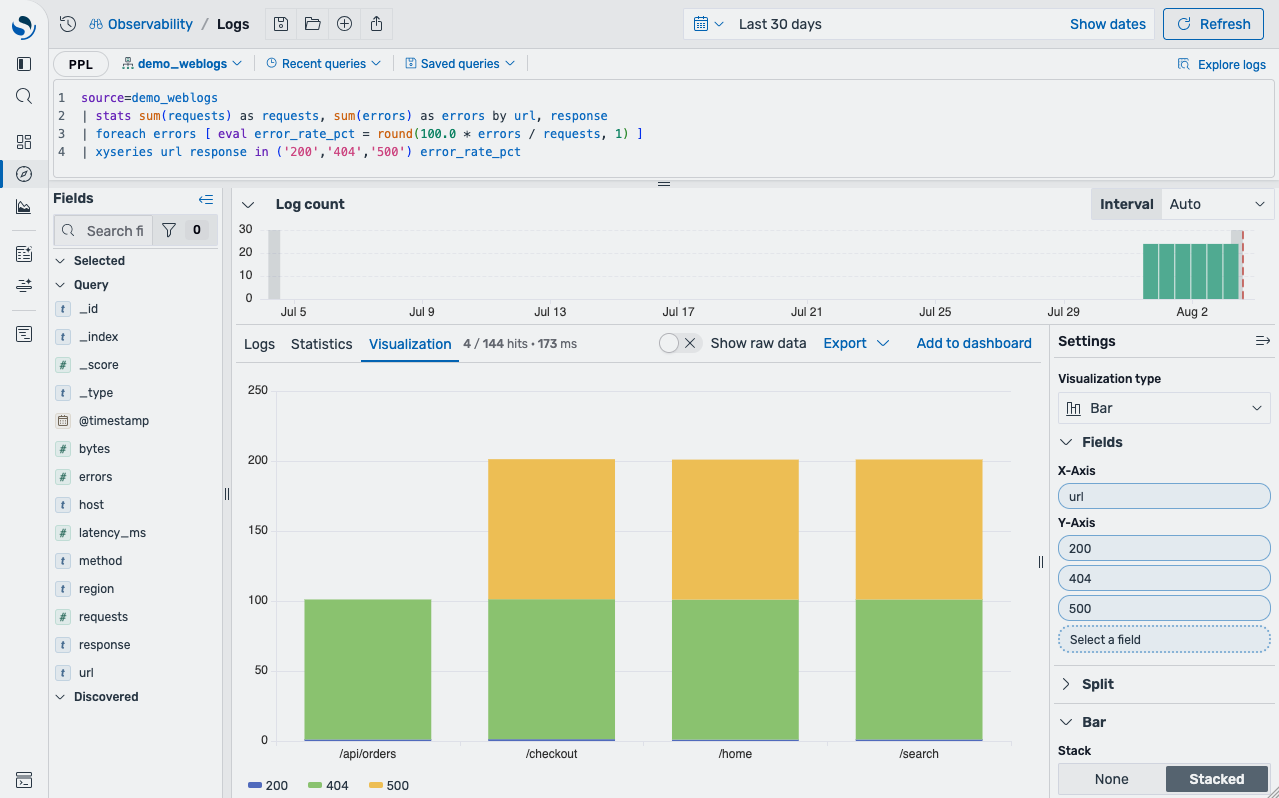 A sample PPL query combining the
stats,foreach, andxyseries commands
Catch PPL query mistakes before they cost you a run
OpenSearch 3.8 introduces a PPL lint engine that validates queries as you type them directly in the editor. The engine catches common pitfalls—such as division-by-zero expressions that silently return null, unsupported window functions, or disabled join types—and provides actionable diagnostics with structured explanations. Field-aware validation identifies unknown field references and offers one-click replacements when a close match exists, while command typo detection turns misspelled commands into clear “Did you mean?” suggestions with inline quick fixes. The feature is opt-in, and each rule can be individually enabled, disabled, or severity-adjusted in Advanced Settings.
Test Grok patterns without leaving OpenSearch Dashboards
A new Grok Debugger in Dev Tools lets you build and validate Grok patterns directly in OpenSearch Dashboards, no external tools required. Paste a sample log line, write your Grok pattern, and simulate the extraction to see the parsed fields instantly. You can also define custom patterns. This streamlines ingest pipeline development by keeping pattern iteration in the interface where you develop and test your configurations.
Create alert rules directly from metric exploration
Finding a metric pattern and turning it into an alert used to require switching between multiple pages. Building on the native Prometheus integration introduced in OpenSearch 3.7, version 3.8 extends this capability. You can now go from identifying a metric pattern to creating an alert on it without leaving the Discover Metrics page. A new Create alert rule action in the toolbar—available whenever you’re querying a Prometheus data source using PromQL—lets you define a rule. Enter your PromQL expression, then configure the threshold, comparison operator, evaluation interval, and any optional labels or annotations. When you save the configuration, the rule is created in the configured Prometheus data source and immediately appears in the Alerting Rules tab, eliminating the need to manually recreate rules using a separate workflow.
Infrastructure updates
The OpenSearch Project is announcing the following updates to platform support and infrastructure.
Deprecating support for Amazon Linux 2 in OpenSearch
Please note that OpenSearch will deprecate support for Amazon Linux 2 as a continuous integration build image and supported operating system in a future version. Amazon Linux 2 reached end of support on June 30, 2026. For more information, see the FAQ document from AWS. For a list of compatible operating systems, see Supported operating systems.
Getting started
OpenSearch 3.8 is available for download across all supported distributions and ready to try on OpenSearch Playground. For the complete list of updates, refer to the release notes, documentation release notes, and updated documentation. We’d love to hear how these capabilities are working for you—share your experience on the community forum, project GitHub, or Slack instance.
Join us at OpenSearchCon North America
OpenSearchCon North America 2026 takes place September 22–24 in San Jose, Calif., bringing together developers, architects, and enterprise leaders to explore what’s next for search, observability, and AI-powered infrastructure. This year’s schedule features more than 60 sessions with speakers from Apple, CERN, IBM, LinkedIn, Uber, and more, plus hands-on workshops for building observability stacks and agentic AI applications. Register now and join the community in person.